Stone Island Jackets: Spreadsheet vs Google Sheets
Inside this note
Set Your Organizing Goal First If your task is to narrow down a few candidates worth further checking from the Stone Island jacket catalog, the key is not to move all product information into another sheet at once. Instead, keep the fields that help you decide, and record the verification results later. The Stone Island category page on fashion-reps currently shows 6 product cards. The page provides product titles, reference prices, QC entry poin
Set Your Organizing Goal First
If your task is to narrow down a few candidates worth further checking from the Stone Island jacket catalog, the key is not to move all product information into another sheet at once. Instead, keep the fields that help you decide, and record the verification results later.
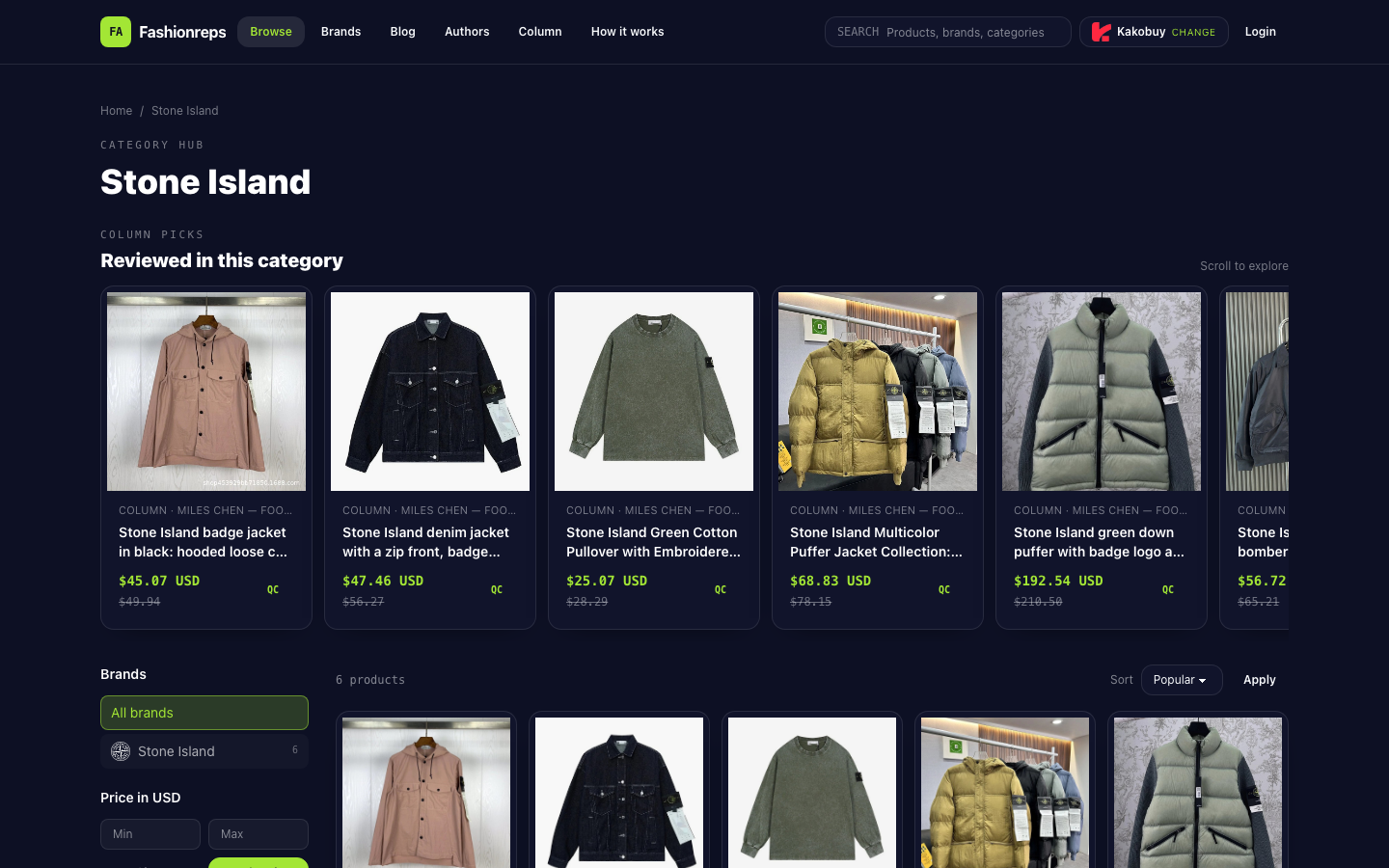
The Stone Island category page on fashion-reps currently shows 6 product cards. The page provides product titles, reference prices, QC entry points, and category filters and sorting options. This article uses the site catalog for initial screening and Google Sheets for follow-up records; the division of labor between the two cannot replace further verification on product pages, QC images, or shopping agent pages.

Image: Screenshot of the Stone Island category catalog page, as a layout reference, not as product photos, QC, or personal evidence.
Confirm Candidates on the Site Catalog First
The site catalog is good for answering three questions first: what candidates are there, how to tell each card apart, and whether there are links for further checking.
The 6 candidates currently visible and their reference prices shown on the page are as follows:
| Identifying info in candidate title | Reference price shown on page | Clues to keep during initial screening |
|---|---|---|
| Black badge jacket, hooded, relaxed fit, bamboo fiber blend | $45.07 | Color, hood, fabric description, QC entry |
| Denim jacket, zip front, badge detail, relaxed fit | $47.46 | Denim material, zip, fit, QC entry |
| Green cotton pullover, embroidered badge detail | $25.07 | Green, cotton, pullover style, QC entry |
| Multicolor down jacket, 700 fill power duck down, sleeve badge, multiple colorways | $68.83 | Multicolor, fill description, colorway clues, QC entry |
| Green down jacket, badge logo, knit panel, SS26, unisex | $192.54 | Green, knit panel, collection and gender description, QC entry |
| Gray cotton bomber jacket, published M–XXL size chart | $56.72 | Gray, bomber jacket, size range, QC entry |
These prices are reference prices in the catalog and cannot be taken as final transaction prices. The page content also does not confirm stock, shipping, actual fit, or product quality in this evidence, so do not recommend a candidate for purchase based solely on price.
What the Site Spreadsheet Handles
The site catalog is best for quick browsing and initial elimination. After opening the Stone Island category page, you can process in this order:
- First look at the product card title, and extract distinguishing info like color, style, material, or collection.
- Check the reference price on the card to confirm which candidate the price corresponds to; don't copy the previous product's price to the next.
- See if there is a QC entry. A QC entry only means the page provides a path to related content; it does not prove the product quality is good.
- Use the existing brand and price filters to narrow the catalog; the page also offers sorting options like Popular, Latest, Price: low to high, and Price: high to low.
- Copy the candidate titles and product page URLs that still need checking into your own record sheet, keeping the correspondence with the original page.
The point of this step is to identify candidates, not to make final purchase decisions on the site catalog. Especially record the green cotton pullover and the green down jacket separately, and keep the different size or fill descriptions of the multicolor down jacket and the gray cotton bomber jacket.
What Google Sheets Handles
When there are more than one or two candidates, it's easy to mix up statuses by just browsing. Google Sheets is better for building a checklist with one candidate per row, to record what you've confirmed, not confirmed, and decided to eliminate.
Suggested fields at minimum:
- Candidate ID: e.g., SI-01 to SI-06.
- Catalog title: Copy the full card title from the page; don't just write "black jacket" or "green down jacket".
- Color or colorway: Only fill in color info explicitly stated in the title.
- Style features: e.g., hooded, denim, pullover, bomber jacket, or knit panel.
- Fabric or fill description: Only keep expressions that appear on the page, like bamboo fiber blend, cotton, 700 fill power duck down.
- Size clues: e.g., M–XXL explicitly stated on the page; leave blank when no evidence, don't fill in sizes yourself.
- Reference price: Keep the dollar amount and note it is the reference price shown on the page.
- QC entry: Record whether you can proceed to QC-related content from the catalog card, and whether you've viewed it later.
- Product link: Keep the original URL corresponding to the title.
- Verification status: To verify, page viewed, pending confirmation, or eliminated.
- Elimination reason: e.g., style doesn't fit, key fields missing, or cannot complete further verification.
- Last review time: Used to distinguish old records from the most recent check.
Among these, elimination reason is especially important. Lack of size evidence, inability to confirm link correspondence, or just not meeting your current filter criteria should not be written as "bad quality". When evidence is insufficient, the accurate status should be "pending confirmation" or "cannot verify", not a negative conclusion.
A Reviewable Division of Labor Process
Step 1: Initial catalog screening
On the fashion-reps Stone Island category page, first view all 6 cards. Distinguish candidates by color, style, and material in the title, and number those that might fit your needs. At this stage, only record what the page actually shows; don't infer material, thickness, or size from image appearance.
Step 2: Build a record with one product per row
Put each candidate in a separate row; don't combine multiple colorways of a multicolor item into one entry, and don't scatter the title, price, and QC status of the same product. The full title should serve as a reference for lookups; short labels are only for filtering.
Step 3: Recheck links and QC entries
Open the corresponding product link row by row, confirm the title and price still match your record, then check the QC entry provided on the page. If the link is broken, the page doesn't correspond, or the info is insufficient to confirm the candidate's identity, mark it as pending confirmation or eliminated; don't continue to treat it as a recommended purchase.
Step 4: Add size and decision status
Only fill in a specific size range when the page explicitly provides size information. The current catalog evidence explicitly mentions the gray cotton bomber jacket has an M–XXL size chart; whether other candidates have the same size range cannot be inferred from this category page summary.
Step 5: Recheck before placing an order
Before entering the shopping agent or payment process, recheck the product link, price, stock, shipping, size chart, and QC content. The catalog evidence in this article does not confirm these dynamic details, so they cannot be automatically derived by the site Spreadsheet or Google Sheets.
How to Decide Which Fields Stay on Site and Which Go into Sheets
A simple principle: fields used for discovering products on the page stay on the site; judgment fields that you need to update continuously go into Sheets.
The site catalog keeps title, card image, reference price, filters, sorting, and QC entry, because these belong to page browsing and navigation. Google Sheets records candidate ID, verification status, recheck results, elimination reason, and last review time, because these are part of your organizing process, not product facts provided by the catalog.
Don't copy unsupported information from the page just to make fields complete. For example, if the page doesn't confirm stock, shipping, actual purchase price, or quality level, mark it as "unverified" in the sheet, not an estimated value. That way, even if the page changes later, you can see which conclusions came from the catalog and which are just incomplete work.
Conclusion
Organizing Stone Island candidates can use a two-stage process: first use the site catalog for discovery, filtering, and link rechecking, then use Google Sheets to manage candidate status, size clues, QC checks, and elimination reasons. The site page helps you see what cards are currently available, and Sheets helps you avoid repeated checks and mixing up different styles.
This division of labor can only improve the catalog organizing process; it cannot prove the product is in stock, the price is finally valid, the size will fit, or quality has passed. Any purchase-related judgment should go back to the corresponding product page, QC content, and shopping agent page for item-by-item verification.
Community feedback
5 approved
Reader score 4.2 / 5 (5 ratings)