Rammstein Jerseys: Spreadsheet vs Google Sheets
Inside this note
When preparing to purchase Rammstein jerseys or related tops, the real problem isn't just copying product names into a spreadsheet—it's organizing candidate styles, size information, image evidence, and product pages into reviewable records. Fashion-reps' website-style catalog is great for discovering and viewing candidate items, while Google Sheets is ideal for continuous filtering, supplementing, and collaboration. Using both together can reduce repe
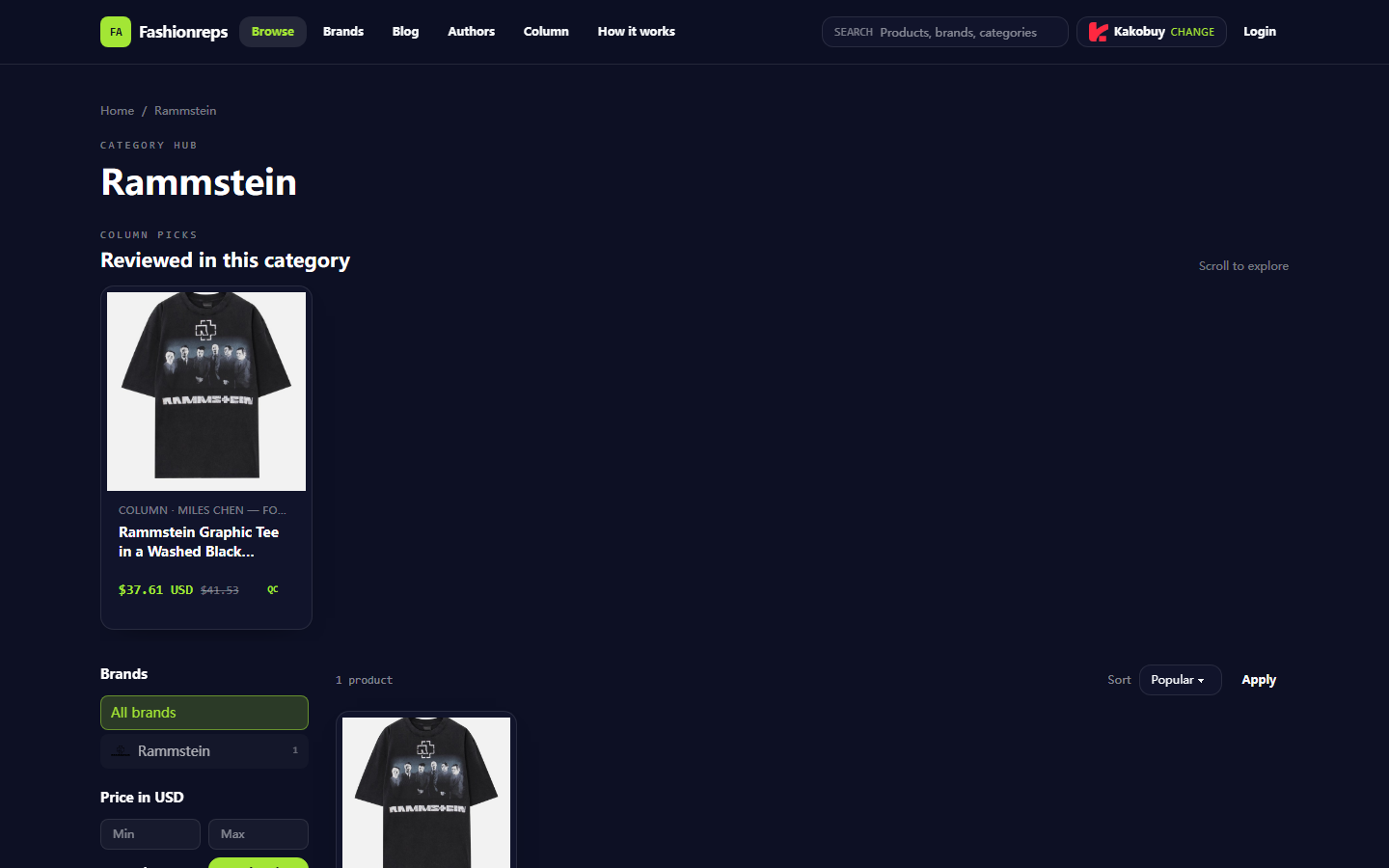
When preparing to purchase Rammstein jerseys or related tops, the real problem isn't just copying product names into a spreadsheet—it's organizing candidate styles, size information, image evidence, and product pages into reviewable records. Fashion-reps' website-style catalog is great for discovering and viewing candidate items, while Google Sheets is ideal for continuous filtering, supplementing, and collaboration. Using both together can reduce repeated page openings, image mix-ups, and missed size information. 🧾
This guide is for those who have already found Rammstein product candidates but haven't completed pre-purchase verification. After reading, you should be able to create a spreadsheet with product name, size, color, image evidence, original page, and verification status. It does not apply to order decisions that require confirmed inventory, price, size charts, or shipping costs, as these still need to be checked separately on the actual product page and subsequent purchasing platform.

Pre-Purchase Tasks for Organizing Rammstein Jerseys
First, limit the task to one actionable outcome: capture candidate styles from fashion-reps' Rammstein product pages and record enough evidence in Google Sheets to support the next decision.
At minimum, record the following fields:
- Product name
- Reference price displayed on the page and verification date
- Visible size range
- Color or pattern description shown on the page
- Whether the main product image or QC images are visible
- Whether the images correspond to the current product page
- Original product page URL
- Whether a size chart exists
- Whether stock status is clear
- Current status: pending evidence, comparable, or put on hold
Don't write "looks like a jersey" as confirmed product type. If the page only shows a Rammstein graphic top without clearly stating jersey cut, team logo, fabric, or official licensing, preserve the page's original description and mark the product category as to be verified. 🔍
Fixing Jersey Candidates and Visible Fields from fashionreps Website-Style Spreadsheet
Fashion-reps' visible catalog is good for initial discovery. The page offers brand or theme categories, product cards, price filtering, sorting, and product detail entry points. The currently visible Rammstein category page shows one Rammstein graphic top candidate, and the page also displays the product name, size range hint, and reference price information.
First-round operations can be done in this order:
- Enter the Rammstein category page and confirm the page indeed belongs to the Rammstein theme, not a generic rock or regular T-shirt category.
- Record the full name on the product card—don't just save a self-abbreviated "Rammstein jersey".
- Open the product detail page and check whether the product name, images, price, size, and purchase entry still correspond to the same style.
- Copy what's directly visible on the page into Google Sheets.
- For fields not displayed, fill in "page not shown"—don't fill in based on images or common sense.
The website catalog is better for browsing and locating. It may not be ideal for long-term storage of complex verification records, especially when you need to compare multiple candidates, mark missing fields, or have others review. The roles of the website page and spreadsheet should be separated: the website provides original page evidence, and the spreadsheet organizes the judgment process. 🗂️
Recording Sizes, Colors, Images, and Links in Google Sheets
Google Sheets' advantage isn't replacing the product page but organizing visible information from different pages into a unified structure. It's recommended that each row corresponds to one product page or one clear variant, avoiding splitting different images of the same product into multiple rows and losing correspondence.
| Field | Suggested recording method | Evidence requirement |
|---|---|---|
| Product name | Copy the full page name | Must come from product card or detail page |
| Size | Record what the page actually shows | Write "not shown" if no size chart |
| Color or pattern | Use page description, add "image visible" if necessary | Do not write subjective color judgments as official fields |
| Image evidence | Save description of main image, detail images, or QC images | Confirm images belong to current page |
| Page URL | Keep original product page URL | Do not replace with category page |
| Verification status | Pending evidence, comparable, on hold | Status must be explainable by records |
To reduce errors, you can set "size clear", "images match", and "price verified" as checkboxes, and "verification status" as a dropdown. When filtering, first filter for items with clear sizes and matching images, then handle price or purchase path. This way, a prominent price field won't cause you to ignore missing size or image evidence.
If multiple people are collaborating, write in the notes column "who needs to provide evidence" and "what to provide", for example "confirm whether detail page has shoulder width and length". Don't overwrite original fields with chat-based speculation; speculation should go in a separate notes column. 🤝
Comparing Website Catalog Browsing and Spreadsheet Filtering Workflows
The website catalog and Google Sheets solve problems at different stages. The website is suited for exploring by category, brand, sorting, and product cards; the spreadsheet is suited for filtering by size completeness, image status, price verification date, and processing status.
You can use a cycle of "website discovery, spreadsheet capture, page review, spreadsheet decision":
- Website discovery: confirm Rammstein category and candidate products.
- Spreadsheet capture: record name, page URL, and currently visible fields.
- Page review: reopen product page and check whether images, sizes, and prices still correspond.
- Spreadsheet decision: based on evidence completeness, decide to keep, gather more evidence, or put on hold.
Don't interpret the website category page's sorting results as a quality ranking, and don't interpret a product's presence in the category page as stock confirmation. The category page only shows that the content is visible on the current page, and cannot alone prove availability, complete size range, or that images represent actual condition.
Checking Whether Images Correspond to the Same Style and Page Information
The core of image evidence is correspondence, not quantity. At minimum, check whether the image's pattern, color, cut, and page name are consistent with each other. If the page only provides one main image, record "images limited" rather than using the main image as complete detail evidence.
Add these judgments to the spreadsheet:
- Whether the image comes from the current product detail page
- Whether the front pattern in the image matches the product name
- Whether back, collar, cuffs, or fabric details are visible
- Whether the image is sufficient to distinguish different colors or versions
- Whether there are obvious inconsistencies between the image and page text
If images cannot confirm size, fabric, licensing, or actual condition, leave those fields as unconfirmed. Images support visual correspondence but cannot automatically prove stock, quality, authenticity, or wearing effect. 📷
Differences in Mobile Viewing, Copying Links, and Back Navigation
Mobile is convenient for quickly viewing product images and copying page URLs, but long product names, multiple fields, and multi-page comparisons are more prone to omissions. When using mobile, copy the original product page URL first, then return to Google Sheets to fill in the record, to avoid losing the current page during browser back navigation.
Desktop is better for having the product page and spreadsheet open simultaneously, especially when comparing sizes, images, and notes. Regardless of device, check three things before saving: whether the current row corresponds to the current product, whether the page URL is a product detail page, and whether image descriptions have been mistakenly written for another product.
Thumbnails on mobile may not show details, so "image visible" does not equal "details verified". If images are too small or don't load completely on mobile, mark the status as pending evidence rather than directly judging style or material. 📱
Evidence Boundaries When Price, Stock, and Size Chart Are Missing
Price, stock, and size are highly volatile or high-risk information, and must record verification date and applicable page. The reference price visible on the current page can only serve as a reference value shown at that time, not as the final payment amount. Final amount may also be affected by shopping agent, international shipping, taxes, route restrictions, or other order conditions.
If the page doesn't clearly indicate stock, write "stock unclear"; if no size chart, write "size chart not shown"; if only a range like XS–L is shown, don't derive chest width, length, or suitable height on your own. Buyers should double-check available sizes and current stock with the actual purchasing platform before deciding to buy.
Similarly, don't judge fabric thickness, print durability, official licensing, or actual quality based solely on product images. When key evidence is missing, the safest action is to keep the candidate, mark the gap, and postpone the final purchase decision. ⚠️
After Organizing: Keep, Gather More Evidence, or Put on Hold
After organizing, records can be divided into three categories:
- Keep: product name, page URL, image correspondence, and key fields are recorded, suitable for entering the next round of price and purchase condition verification.
- Gather more evidence: product worth continuing to track, but missing size chart, detail images, stock, or page information, needs re-verification.
- Put on hold: page information contradictions, images cannot correspond, product category unclear, or current evidence insufficient to support purchase decision.
This organizing method saves time on repeated searching and re-verification, but does not guarantee lower product prices or shipping costs. It adds a small spreadsheet maintenance cost and exposes risks that are easy to overlook otherwise, such as missing size information, images not fully matching names, reference price not being final cost, and stock status not clearly stated.
It suits those who need to compare multiple Rammstein candidates, want to preserve image and page evidence, or need to collaborate with others. It is not suitable for those who want to order immediately based on one product image, nor for those who treat the website catalog as proof of stock, quality, or licensing. After completing the spreadsheet, the next step is to reopen the product pages of kept candidates, check current sizes, prices, stock, and actual purchase paths, and then decide whether to proceed to order.
Community feedback
0 approved
- No approved comments yet.