Dior Luggage: Match Specs, Links, and QC
Inside this note
Determining whether the same Dior luggage is consistent across fashionreps and an agent platform requires more than checking the brand name or page thumbnail. You must compare item identity, specification fields, link mapping, and QC evidence item by item; if any on
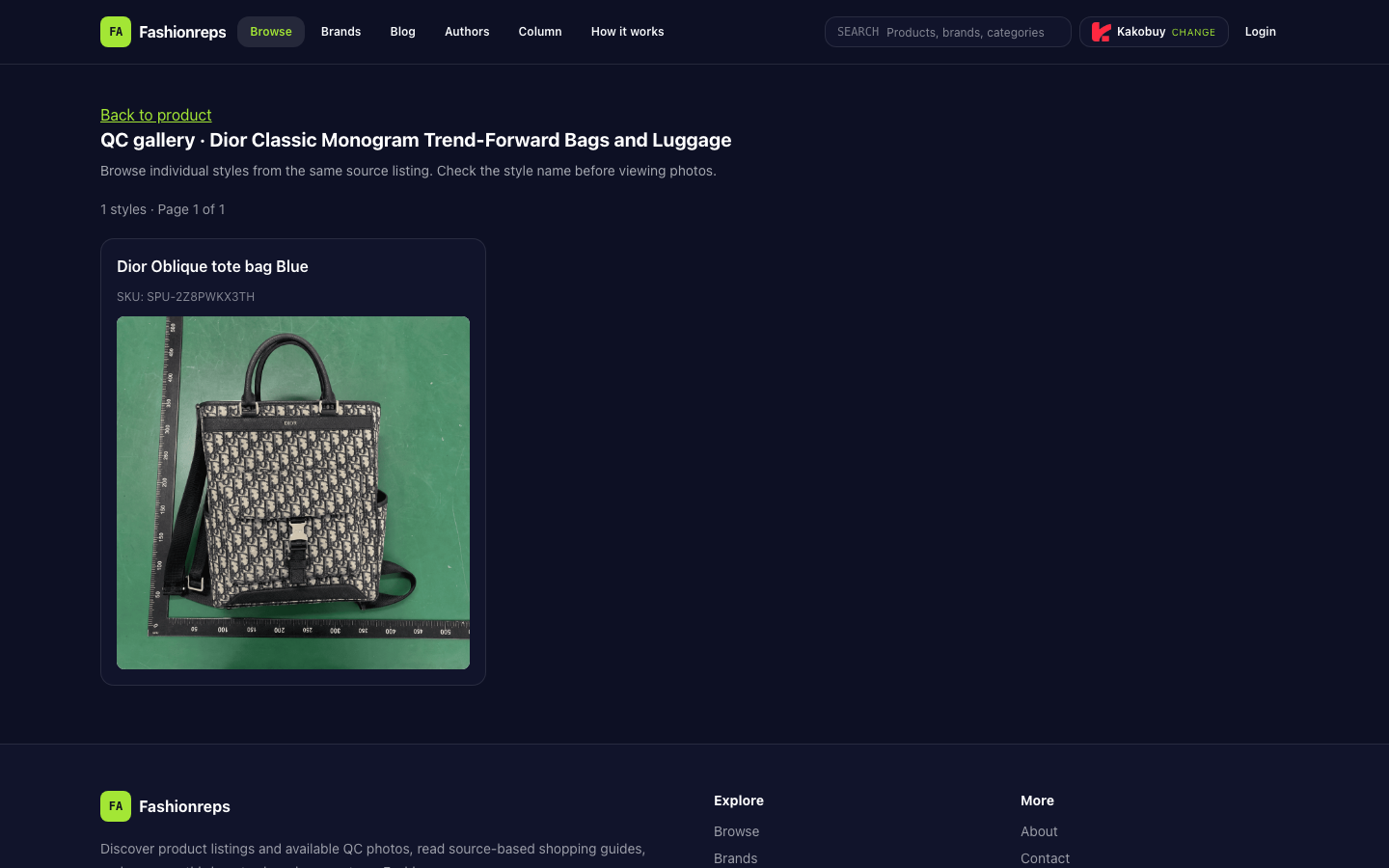

Determining whether the same Dior luggage is consistent across fashionreps and an agent platform requires more than checking the brand name or page thumbnail. You must compare item identity, specification fields, link mapping, and QC evidence item by item; if any one of these cannot be confirmed, do not treat it as the same item for ordering.
First confirm what the fashionreps page actually displays
The currently verifiable page is Fashionreps' QC photos page, titled "Dior Classic Monogram Trend-Forward Bags and Luggage". The page also shows "1 styles", and the visible style name is "Dior Oblique tote bag", color Blue, SKU "SPU-2Z8PWKX3TH".
This information is insufficient to prove that the page displays luggage. The page title includes bags and luggage, but the currently visible style is a tote bag, so you cannot write it off as a specific Dior luggage based solely on the page title, nor can you confirm dimensions, capacity, material, handle structure, or wheel configuration from that title.
Use four sets of fields to verify item identity
It's recommended to first record all visible content on the fashionreps page completely, then compare it field by field with the agent page or order draft. Do not fill in fields that are not displayed on your own.
| Check item | Currently confirmable information | Still needs evidence |
|---|---|---|
| Page and product name | Page title is Dior Classic Monogram Trend-Forward Bags and Luggage; visible style is Dior Oblique tote bag | Whether it is actually luggage, and the specific model name |
| Color and SKU | Color is Blue; SKU is SPU-2Z8PWKX3TH | Does the agent retain the same color and SKU, or generate a new internal number |
| Dimensions and specs | Current evidence does not provide dimensions, capacity, weight, or structural parameters | Need product detail page, variant selection page, or written confirmation from customer service |
| QC entry | Page provides QC photos entry | Can the agent map this item to the same order, same variant, and corresponding QC images |
If the agent page only shows "Dior luggage" or a similar image but does not retain the original SKU, color, and traceable link, you cannot conclude that the item identity is consistent.
Then check link mapping, not just whether links open
Link checking should record at least four locations: the fashionreps product detail link, the fashionreps QC link, the product link after import into the agent, and the product link in the order details after ordering. That all four locations open does not mean they point to the same item.
When checking item by item, you can follow this order:
- On the fashionreps page, record the page title, specific style name, color, SKU, and QC page URL.
- Enter the selected agent through the purchase entry on the page, and check whether the imported item still displays the same product name, color, and SKU.
- Open the variant selection area and confirm that it has not been automatically switched to another color, size, or style.
- Save the imported item as an order draft, do not rush to pay, and first check whether the order details still retain the original product link or traceable fields.
- Before ordering, confirm that the QC entry corresponds to this order and this variant, not another product on the same page.
The source page clearly states that the buy button leads to the chosen shopping agent; orders, payment, and shipping are handled by the agent's website. Therefore, the fashionreps page provides an entry point for discovering the product and viewing QC information, and cannot replace the agent's order records, fee explanations, or after-sales promises.
What to check for the QC entry
The existence of QC images does not mean specifications have been verified. Confirm whether the following are all true:
- The product name on the QC page matches the order draft.
- The color in the QC images matches the selected color.
- The SKU or other traceable number has not been replaced with another item.
- The images show key parts related to luggage, such as shape, handle, wheels, interior, and size labels; if the page actually displays a tote bag, you cannot treat these unseen parts as verified.
- The QC images belong to the current order, not historical images of the same or similar style from the source page.
If you can only see the public QC entry on the source page but not the corresponding QC record in the agent order, you should classify the result as "needs evidence" rather than "verified".
Questions to confirm with the agent's customer service
The existing evidence does not provide an official help page for a specific agent, nor verifiable information about its orders, fees, or QC process. Therefore, you cannot specifically assert that a certain platform will definitely preserve variants, automatically sync SKU, charge certain fees, or provide QC images at a certain stage.
Before proceeding, you can send a set of specific questions to the agent's customer service:
- After importing the link, does the system preserve the fields Dior Oblique tote bag, Blue, and SPU-2Z8PWKX3TH?
- If the user wants to verify luggage, can the agent confirm that the current link actually corresponds to luggage, not a tote bag?
- Are QC images provided before payment, after warehousing, or before shipping?
- Are QC images bound to the order and specific variant?
- If the item shown in the images does not match the original page, can it be paused, returned, or exchanged? What are the associated fees and time limits?
- Does the order detail retain the traceable original product link or SKU?
When customer service does not provide clear written answers, do not treat the default process as a platform promise.
Decide next steps based on three outcomes
Information consistent: page object, color, SKU, variant, order records, and QC entry all correspond to each other, and the agent has clearly explained fees and QC timing. At this point, you can only say that the information chain has been checked, but still cannot treat QC images as absolute proof of material, durability, or physical quality.
Needs evidence: some fields match, but dimensions, object type, order mapping, or QC attribution cannot be confirmed. Save the page and customer service replies first, and decide after filling in the missing information.
Should pause: the page actually displays a tote bag but is described as luggage; SKU, color, or variant changes; QC entry cannot be matched to the order; or the agent cannot explain fees, returns, and issue reporting process. At this point, you should not continue payment or recommend this link as a verified luggage.
Based on the currently visible evidence, the safest conclusion is: the fashionreps page can confirm a QC entry named Dior Oblique tote bag, color Blue, SKU SPU-2Z8PWKX3TH, but it is not yet sufficient to confirm that it is the target Dior luggage, nor to prove that it corresponds to the item identity and order QC entry on any agent platform.
Community feedback
0 approved
- No approved comments yet.